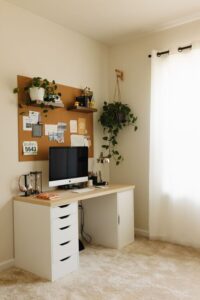

Creating a productive home office space is essential for anyone working remotely or managing tasks at home. A well-organized and comfortable workspace can help improve focus, reduce stress, and increase efficiency. Whether you have a dedicated room or just a small corner, these tips can help you transform your home office into a productive environment.
Choose the Right Location
Selecting the best spot for your home office is the first step to building a productive workspace. Ideally, pick a quiet area away from distractions such as the television, high-traffic zones, or noisy appliances. Natural light is a bonus because it boosts mood and reduces eye strain. If possible, set up near a window to enjoy daylight.
If space is limited, consider using a folding desk or a compact workstation that fits in small corners without compromising comfort.
Invest in Comfortable Furniture
Comfort plays a crucial role in productivity. An ergonomic chair that supports your back and encourages good posture can prevent discomfort and fatigue during long work hours. Pair it with a desk at the right height so your arms are parallel to the floor when typing.
Adjustable chairs and desks are great options, allowing you to customize your setup. Some people prefer standing desks or desk converters to alternate between sitting and standing.
Organize Your Workspace
Clutter can make it harder to focus. Keep your desk tidy by using organizers, shelves, and storage containers. Arrange your tools and files so that the items you use most often are within easy reach.
Try cable management solutions like clips or sleeves to keep cords neat. A clean, minimal space helps clear your mind and reduces distractions.
Set Up Proper Lighting
Good lighting is important for reducing eye strain and maintaining focus. Along with natural light, use adjustable task lighting like desk lamps that provide direct illumination where you need it.
Avoid harsh overhead lights or glare from screens. If your workspace lacks natural light, consider daylight bulbs designed to mimic sunlight.
Minimize Distractions
Working from home means potential distractions from family members, pets, or household chores. Communicate your work hours to others and establish boundaries to minimize interruptions.
Use noise-canceling headphones or play background music or white noise to drown out distracting sounds. Turning off non-essential notifications on your devices can also help maintain concentration.
Personalize Your Space
Adding personal touches like plants, photos, or art can make your home office feel inviting and motivating. Plants not only brighten the room but can also improve air quality.
Choose decor that inspires you without overwhelming the space. Balance is key to keeping your environment both functional and pleasant.
Use Technology Efficiently
Ensure your internet connection is fast and reliable. Organize your digital workspace by keeping files structured and using tools like calendars and task managers to track deadlines and appointments.
Regularly back up important documents and consider dual monitors if your work involves multitasking or detailed tasks. Keeping your devices updated and your workspace tech-friendly helps streamline your workflow.
Take Regular Breaks
To maintain productivity and avoid burnout, schedule short breaks throughout your workday. Use these moments to stretch, hydrate, or take a quick walk. A timer or reminder app can help you stick to break intervals.
A well-planned home office not only supports your work but also promotes a healthy work-life balance.
Final Thoughts
Designing a productive home office takes some planning and effort, but the benefits are worth it. By choosing the right location, investing in comfort, organizing effectively, and managing distractions, you can create a workspace that supports your best work every day.
Remember, your home office should work for you — feel free to adjust and improve it as your needs change. A comfortable, efficient environment makes working from home more enjoyable and productive.